Wednesday, June 27, 2012

Announcing Sapphire 0.5 Release

On behalf of all who contributed, I am very proud to announce availability of Sapphire 0.5 as part of Juno Simultaneous Release. This release includes major enhancements, such as significantly stronger and lighter-weight diagram support, drag-n-drop in forms, more presentation options for possible values and actuators, improved and expanded services, and much more.

Enhancements
Migration Guide
Developer Guide
Downloads

But wait, there is more… After final Juno contribution deadline, Sapphire team continued to work hard testing the new release and fixing issues that were discovered. The result of that effort is the 0.5.1 release that is also available today.

There are now more ways than ever to get your hands on Sapphire. The newest method is to install it from the Juno repository. Look for Sapphire under Application Development Frameworks.

Perhaps the simplest way to install the latest version of Sapphire is from Eclipse Marketplace.

Last, but not least, Sapphire website provides information about every past and future release, including plans, documentation, bugzilla queries, as well as links to downloads and repositories.

Enjoy and don’t forget to leave your feedback on the adopter forum.

Saturday, March 3, 2012

Announcing Sapphire 0.4.1 Release

It is with great pleasure that I announce availability of Sapphire 0.4.1 release. This maintenance release extends support to Indigo SR2 and includes five bug fixes for issues raised by adopters. Adopters of 0.4 release can expect full backwards compatibility. No migration guide is being published.


Developer Guide
Downloads

Thursday, December 1, 2011

Announcing Sapphire 0.4 Release

On behalf of all who contributed, I am very proud to announce availability of Sapphire 0.4 release. This release includes major enhancements, such as API improvements in services and XML binding, more powerful Sapphire EL and ability to use it in more places, content proposals in text fields, split form, regular multi-section form editor page for cases where master-details presentation isn't appropriate, and much more.

Enhancements
Migration Guide
Developer Guide
Downloads

Saturday, November 19, 2011

Java Language Puzzle 3

Given the following source listing, explain why the compiler is producing a warning at invocation to the list method and give a solution for removing the warning without resorting to @SuppressWarnings annotation.

public class JavaLanguagePuzzle3
{
    public static void main( String[] args )
    {
        list( "1", 2, new BigDecimal( "3.5" ) );
    }
    
    private static <T> List<T> list( T... items )
    {
        return Arrays.asList( items );
    }
}

Warning:

Type safety: A generic array of Object&Serializable&Comparable<?> is created for a varargs parameter

Friday, October 7, 2011

Announcing Sapphire 0.3.1 Release

It is with great pleasure that I announce availability of Sapphire 0.3.1 release. This maintenance release includes 64 bug fixes and enhancements. Adopters of 0.3 release can expect full backwards compatibility. No migration guide is being published.

Enhancements
Developer Guide
Downloads

Wednesday, August 24, 2011

Using Sapphire to Work with Java Types

This article covers an intermediate topic related to Sapphire. Those unfamiliar with Sapphire should first read the introduction.

When implementing Eclipse tooling that works with Java projects, a frequent requirement is to deliver models and UI that reference Java types (classes, interfaces, enumerations and annotations). Implementing this from scratch, even using the excellent API provided by JDT is a challenge. Fortunately, Sapphire's JDT integration makes this quite easy.

The first step is the model.

@Type( base = JavaTypeName.class )
@Reference( target = JavaType.class )
@Label( standard = "filter" )
@JavaTypeConstraint( kind = { JavaTypeKind.CLASS, JavaTypeKind.INTERFACE }, type = "java.io.FileFilter" )
@MustExist
@Required

ValueProperty PROP_FILTER = new ValueProperty( TYPE, "Filter" );

ReferenceValue<JavaTypeName,JavaType> getFilter();
void setFilter( String value );
void setFilter( JavaTypeName value );

Here we utilize reference value construct which states that the property holds a JavaTypeName which is resolvable to a JavaType. The resolution is provided by the framework and works as long as the model is loaded in the context of a Java project.

The @JavaTypeConstraint annotation specifies that the referenced type must be a class or an interface and that it must derive from java.io.FileFilter type.

The @MustExist annotation specifies that the named type must be present in the project.

The @Required annotation specifies that the property must have a value (null is not ok).

The next step is the UI definition. Here we create an editor section with a single property editor, but the property editor is, of course, not limited to editor sections. It can be used in any form context.

<section>
    <content>
        <property-editor>Filter</property-editor>
    </content>
</section>

That is all that is necessary to define a model property that references a Java type and to present that property in the UI. Once this example is executed, you will see a property editor that is composed of a label, a text box, two action buttons and a validation feedback marker.

Capture-1

Clicking on the validation feedback marker shows the problem message along with wealth of semantic information about the property.

Capture-2

The browse button provides the means to select from among existing Java types using JDT's type selection dialog. The framework automatically constraints the contents of the dialog based on @JavaTypeConstraint annotation.

Capture-3

Capture-4

The create button provides the means to define a new Java type if the specified type name cannot be resolved.

Capture-5

Since @JavaTypeConstraint annotation in this example specifies that the property can reference either a class or an interface, the user is presented with a choice after clicking on the create button.

Capture-6

Once the appropriate option is selected, the new type is created and opened in the Java editor. The created type derives from the type specified in @JavaTypeConstraint annotation and is formatted according to user's format preferences.
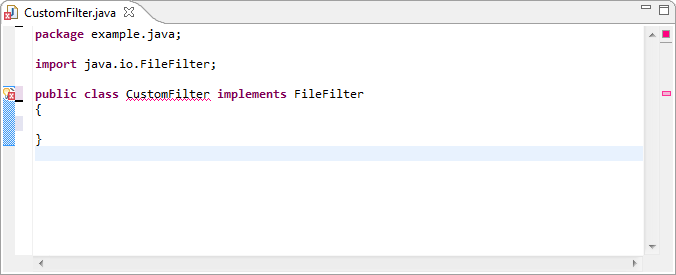
Capture-7

Note that this article covers features in 0.3.1 and 0.4 releases of Sapphire, which at the time of this writing are still in development. A subset of the described features is available in version 0.3, which is the latest released version. Please direct all questions to the forum.

Monday, August 1, 2011

From XML to Form to Diagram with Sapphire

Many of the systems that developers and administrators interact with on the daily basis are configured via a menagerie of XML files. Even armed with a schema and a good XML editor, users have a hard time editing these files by hand. A good tooling strategy to address this difficulty is to create a multi-page editor where a user can flip back-n-forth between XML source view and a higher level form-based view. Going a notch further, certain relationships can be presented with one or more diagrams on separate pages.

Unfortunately, building such multi-page editor using basic Eclipse platform facilities is a daunting challenge. It can take many months to create something half-decent for even smaller schemas. Sapphire can make this a much less daunting task by focusing developer attention on modeling semantics of the data rather than wiring individual widgets.

properties-view-1

I have proposed a talk for EclipseCon Europe 2011 to present Sapphire as a whole and the new diagram editing features in Sapphire 0.3 (Indigo) release. You can comment and vote on the proposal if you are interested.

Proposed Talk: From XML to Form to Diagram with Sapphire

Sapphire is a relatively new project at Eclipse started with an initial contribution from Oracle. It is a UI building framework that allows developers to specify UI in terms of higher level constructs like property editors instead of widgets and layouts. This paradigm results in several orders of magnitude improvement in developer productivity while simultaneously delivering better quality UI that is easier to maintain.