Showing posts with label ui. Show all posts
Showing posts with label ui. Show all posts
Friday, September 30, 2016
Announcing Sapphire 9.1 and 8.3 Releases
Sapphire 9.1
and 8.3 releases
are now available. These releases introduce TextSelectionService that allows the framework
users to observe and manipulate the selection in a text property
editor. Additionally, a number of fixes have been made to the
localization system. Sapphire 8.3 is intended for
adopters who are not yet able to require Java 8.

Wednesday, May 18, 2016
Announcing Sapphire 9.0.5 and 8.2.5 Releases
Sapphire 9.0.5
and 8.2.5 releases
are now available. Both include a fix for the validation messages appearing out
of order in some cases and a fix for the diagram editor context menu not
displaying if the editor has been scrolled. Sapphire 8.2.5 is intended for
adopters who are not yet able to require Java 8. Sapphire 9.0.5 will be part of
the upcoming Neon release of Eclipse.
Wednesday, September 23, 2015
UX Fail: No multi-select in Windows 10 Mail
Windows 10 Mail application is a curious creature. It’s clearly designed primarily for tablet touch experience, but I am giving it a try on my desktop because there is a dearth of modern desktop mail clients. As a desktop application, Mail has numerous UX failings. Perhaps the biggest is the absence of multi-select support for messages. This makes managing an inbox that receives a large amount of automated messages unnecessarily tedious.
Tuesday, September 22, 2015
UX Fail: Invisible Title Bar Bounds
The minimalistic design aesthetic that’s pervading the software world has produced some spectacular UX fails. Here is an example from Windows 10. The subject is the humble Notepad application, but the same issue can be seen in other place. Notice how there is no visible separation between the title bar and the menu bar. Both have white background. The problem is that a user with a mouse needs to know the bounds of the title bar in order to be able to drag the window. Without visible bounds and without any other feedback (such as changing of the mouse pointer), the user is left to click and try. Sometimes the window moves, sometimes the window doesn’t move. In other words, a UX fail.

Thursday, September 17, 2015
Announcing Sapphire 9.0.1 Release
On behalf of all who contributed, I am very proud to announce the availability of the Sapphire 9.0.1 release. This release includes a number of fixes in the areas of installation experience, performance and usability. It includes all of the fixes from the 8.2.1 release and is part of the Mars.1 release.
Announcing Sapphire 8.2.1 Release
On behalf of all who contributed, I am very proud to announce the availability of the Sapphire 8.2.1 release. This release includes a number of fixes in the areas of installation experience, performance and usability. It is intended for adopters who are not yet able to require Java 8.
Thursday, July 16, 2015
Announcing Sapphire 9 Release
On behalf of all who contributed, I am very proud to announce the availability of the Sapphire 9 release. This release includes various API improvements, including integration with Java 7 and 8 language features (AutoCloseable and repeatable annotations). Additionally, reference properties now support transparent reference setting, meaning the target of the reference can be assigned to the property, but the model will still store just the id. This release is part of Mars.
Announcing Sapphire 8.2 Release
On behalf of all who contributed, I am very proud to announce the availability of the Sapphire 8.2 release. This release includes a new length constraint for value properties, text field capacity feedback, ability to expand outline nodes with a double-click and various bug fixes.
Tuesday, February 24, 2015
Announcing Sapphire 8.1.2 Release
On behalf of all who contributed, I am very proud to announce the availability of the Sapphire 8.1.2 release. This release includes a number of fixes, mostly in the area of accessibility.
Thursday, December 18, 2014
Announcing Sapphire 8.1.1 Release
On behalf of all who contributed, I am very proud to announce the availability of the Sapphire 8.1.1 release. This releases includes a fix for an issue preventing the scale property editor presentation from being used along with a fix for a NullPointerException that occurs under certain circumstances when creating Java types from an action in a table cell editor.
Thursday, December 4, 2014
Say no to naked p2 repositories!
The standard p2 repository generation tools do not create a landing page for the repository. This creates confusion for novice users who try to visit the published repository in a web browser and get the 404 (not found) error. Beyond novice users, developers and integrators are hampered by inability to easily browse repository content in a web browser.
To save the world from this travesty, I have created a toolkit that can generate a landing page with installation instructions and the content listing pages. These tools are accessible through Ant or directly on the command line.
The landing page contains instructions on how to use Eclipse install software wizard along with a link to browse the repository content.

The repository content pages show all files and folders along with size information. The listing pages have some interesting features that are worth highlighting.
- Size information is listed for folders, not just files
- Relative sizes are presented with a sparkline on the right
- A summary at the bottom shows the number of folders, the number of files, the total size and the last modified date
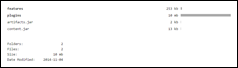

I have put this to use on all Sapphire releases and builds today. I am also making it available for other projects and companies to use, under EPL terms, of course.
The toolkit includes two utilities of interest to those wishing to dress up a p2 repository.
GenFolderListing - generates the content listing pages for the specified folder and all child folders
GenRepositoryLanding - generates a repository landing page with installation instructions and the content listing pages
Note that you don’t need to run both tools as GenRepositoryLanding leverages GenFolderListing internally.
Ant Usage
First, import the toolkit...
<import file="sapphire-releng-tools.xml"/>Alternatively, the jar can be used by itself without the library xml file, but the matching targets will not be available. This may be sufficient if the only requirement is to integrate the tools into the flow of another target.
<taskdef resource="org/eclipse/sapphire/releng/antlib.xml">
  <classpath>
    <pathelement location="sapphire-releng-tools.jar"/>
  </classpath>
</taskdef>
Once the toolkit is imported, use the tools as part of your own target...
<gen-folder-listing folder="${folder}"/><gen-repository-landing repository="${repository}" name="${name}"/>or by calling the provided targets directly...
ant gen-folder-listing -Dfolder=[folder]ant gen-repository-landing -Drepository=[repository] -Dname=[name]Command Line Usage
java -cp sapphire-releng-tools.jar org.eclipse.sapphire.releng.listing.GenFolderListingOp [folder]java -cp sapphire-releng-tools.jar org.eclipse.sapphire.releng.landing.GenRepositoryLandingOp [repository] [name]Thursday, November 6, 2014
Announcing Sapphire 8.1 Release
On behalf of all who contributed, I am very proud to announce the availability of the Sapphire 8.1 release. This releases includes lazy loading of editor pages, an improvement to drag-n-drop in forms and all of the bug fixes from the 8.0.2 release.
Announcing Sapphire 8.0.2 Release
On behalf of all who contributed, I am very proud to announce the availability of the Sapphire 8.0.2 release.
Thursday, June 26, 2014
Announcing Sapphire 8 Release
On behalf of all who contributed, I am very proud to announce the availability of the Sapphire 8 release. With this release, Sapphire has exited incubation and is considered a mature project by Eclipse Foundation. Everyone involved with the project should be very proud of what we have accomplished in the last few years.
Wednesday, March 19, 2014
Sapphire 8 : Outline Decorations
Multiple text decorations can now be added to the nodes in the master-details editor page outline in order to show additional information in a way that is set apart from the main node label.

A definition of a text decoration is composed of text and an optional color. Both of these properties support Sapphire EL. When text is null, the decoration is not shown. Multiple decorations can be specified for one node.
<node-factory>
    <property>Categories</property>
    <case>
        <label>${ Name == null ? "Uncategorized" : Name }</label>
        <text-decoration>
            <text>${ ( Items.Size == 0 ? null : Concat( "(", Items.Size, ")" ) ) }</text>
        </text-decoration>
    </case>
</node-factory>
The framework API has changed accordingly.
@Label( standard = "text decoration" )
@XmlBinding( path = "text-decoration" )

public interface TextDecorationDef extends Element
{
    ElementType TYPE = new ElementType( TextDecorationDef.class );

    // *** Text ***

    @Type( base = Function.class )
    @Label( standard = "text" )
    @Required
    @XmlBinding( path = "text" )

    ValueProperty PROP_TEXT = new ValueProperty( TYPE, "Text" );

    Value<Function> getText();
    void setText( String value );
    void setText( Function value );

    // *** Color ***

    @Type( base = Function.class )
    @Label( standard = "color" )
    @DefaultValue( text = "#957D47")
    @XmlBinding( path = "color" )

    ValueProperty PROP_COLOR = new ValueProperty( TYPE, "Color" );

    Value<Function> getColor();
    void setColor( String value );
    void setColor( Function value );
}
public interface MasterDetailsContentNodeDef
{
// *** Decorations ***
@Type( base = TextDecorationDef.class )
@Label( standard = "decorations" )
@XmlListBinding( path = "" )
ListProperty PROP_DECORATIONS = new ListProperty( TYPE, "Decorations" );
ElementList<TextDecorationDef> getDecorations();
}public final class TextDecoration
{
public String text()
public Color color()
}public final class MasterDetailsContentNodePart
{
public List<TextDecoration> decorations()
}Friday, March 7, 2014
Sapphire 8 : Check Box Group
Sapphire already includes a slush bucket and a check box list presentation alternatives for a possible values list.
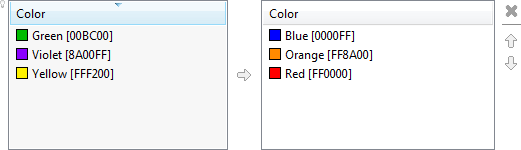

However, in some cases where the set of possible values is known to always be small, a more compact presentation is desired. The new check box group presentation fills this need.
The check boxes can be arranged either horizontally or vertically.


The presentation will utilize ValueImageService and ValueLabelService, if present on the list entry's value property. The services must be attached to the value property's global service context.


Applicability
- The property is a list property
- The list property has a PossibleValuesService
- There is exactly one possible member type
- The member type has exactly one property and that property is a value property
- The value property has @Unique annotation
Automatic Activation
This presentation does not activate automatically.
Manual Activation
The following style codes will activate this presentation as long as the applicability conditions are met.
- Sapphire.PropertyEditor.CheckBoxGroup - produces horizontal presentation
- Sapphire.PropertyEditor.CheckBoxGroup.Horizontal
- Sapphire.PropertyEditor.CheckBoxGroup.Vertical
<property-editor>
    <property>Colors</property>
    <style>Sapphire.PropertyEditor.CheckBoxGroup.Vertical</style>
</property-editor>Thursday, March 6, 2014
Sapphire 8 : Event Suspension
Model events can now be suspended while performing a multi-step operation. This can be helpful in avoiding distracting flashing of the UI as the model goes through the intermediate states.
Element
{
    /**
     * Suspends all events related to this element and everything beneath it in the model tree. The suspended
     * events will be delivered when the suspension is released.
     *
     * @return a handle that must be used to release the event suspension
     */

    Disposable suspend()
}
Property
{
/**
* Suspends all events related to this property and everything beneath it in the model tree. The suspended
* events will be delivered when the suspension is released.
*
* @return a handle that must be used to release the event suspension
*/
Disposable suspend()
}final ElementList<PurchaseOrderEntry> entries = po.getEntries();
final Disposable suspension = entries.suspend();
try
{
final PurchaseOrderEntry entry = entries.insert();
entry.setItem( "USB Cable" );
entry.setQuantity( 2 );
entry.setUnitPrice( "2.5" );
}
finally
{
suspension.dispose();
}Monday, March 3, 2014
Announcing Sapphire 0.7.1 Release
On behalf of all who contributed, I am very proud to announce the availability of the Sapphire 0.7.1 release.
Wednesday, December 18, 2013
Announcing Sapphire 0.7 Release
On behalf of all who contributed, I am very proud to announce the availability of the Sapphire 0.7 release. This is the biggest release in Sapphire’s history. It includes major enhancements, such the new diagram node shape definition language, runtime bytecode generation of implementation classes, improved API for property instances, and much more.
Sapphire 0.7 : Diagram Node Shape Language
The keystone feature of Sapphire 0.7 release is the brand new diagram node shape definition language. Use it to construct complex diagram editors with the same ease as forms.

The language is composed of six primitives.


Subscribe to:
Posts (Atom)

 Posts
Posts

