Tuesday, February 22, 2011

Announcing Sapphire logo

Every noteworthy project requires a cool logo, so I am very pleased to announce that Sapphire now joins that distinguished circle with a brand new logo. The new logo is a contribution of Jean Yao, a talented graphics designer at Oracle. I think you will agree that she has done a great job.

sapphire

The new logo is already featured on the project home page and you can also spot it in recent 0.2.1 and 0.3.0 builds.

about

project-explorer

Tuesday, September 14, 2010

Java Language Puzzle 1

From the domain of stuff that makes you wonder if your debugger is lying to you, I give you a little puzzle. How many times does the following code print the line “Creating crumble…” and why?

public class JavaLanguagePuzzle1
{
    private static abstract class CookieBase
    {
        public CookieBase()
        {
            init();
        }
        
        protected void init() {}
    }
    
    private static class Cookie extends CookieBase
    {
        private Crumble crumble = null;

        protected void init()
        {
            crumble();
        }
        
        public Crumble crumble()
        {
            if( this.crumble == null )
            {
                this.crumble = new Crumble();
            }
            
            return crumble;
        }
    }
    
    private static class Crumble
    {
        public Crumble()
        {
            System.err.println( "Creating crumble..." );
        }
    }
    
    public static void main( final String[] args )
    {
        ( new Cookie() ).crumble();
    }
}

SOLUTION: Pretty much everyone who responded came up with the correct answer of two times. Most correctly explained why that happens. Part of the reason is that explicit member variable initialization in a class happens after the superclass constructor has executed. The part that might be tricky to realize is that explicitly initializing a member variable to null does not have the same runtime behavior as leaving it uninitialized. Removing explicit initialization of crumble to null makes this code behave as it appears to on the surface.

Thursday, August 26, 2010

Inconvenient process? Let’s fix it.

Some of you may have noticed the debate happening regarding proper entry expectations for WTP incubator project following Holger’s veto of a committer election. Holger is acting well within the power granted to him by Eclipse Development Process (EDP), but is it a right and proper action?

Every committer on a project has the veto power in an election. By extension, any entry criteria for a project (whether written or unwritten) is nothing more than a social convention. The reality is that every committer can choose to levy their own personal expectations. Most of the time it’s not a problem, except when it is.

Here are some quotes from this particular event:

“I found only some bug reports but not a single code contribution from any of the four nominated persons. Please attach the planned code contribution to a bug report. I'd like to vote for each of the nominated persons as soon as I know that the code is readable and covered by JUnit tests.”

“Have [snip] been asked if they like to become committers as individuals (and not only as employees of SAP)? Are these authors of the code or what is their motivation to maintain and enhance these editors?”

In a regular project with established code base, established team and well-defined scope, you can argue that giving every committer veto power over elections is appropriate. After all, there is an established code base to protect. The same considerations do not apply when a new component is proposed in an incubator.

The WTP incubator project was started with the intention to provide a low entry barrier playground for people to come and experiment on new ideas while gaining experience and proving their merit to committers on the core projects that will eventually be asked to admit matured functions. Incubators make sense because they provide a quicker way to get started than a separate project proposal. Unfortunately incubators have to rely on a social convention that existing committers act in a welcoming fashion to newcomers. Most of the time that happens, except when it doesn’t.

I would posit that there is no legitimate purpose served by holding a committer election when a new component is proposed for an incubator. The situation is supposed to be very similar to new project creation and we don’t hold elections there. The party proposing a project gets to designate a group of individuals to be the initial committers without anyone questioning their credentials or motives. A similar process is needed to make incubators work better.

The last revision of EDP has formalized the concept of a persistent incubator. I propose that we build on those revisions and amend EDP to remove the committer vote requirement for incubator projects when a new component is being proposed. The project’s PMC would still have the oversight and ability to decline a new component proposal. This change would also fix the rather awkward problem of having to have “seeder” committers when creating incubator projects.

Note that my suggestion is for persistent incubator projects rather than normal projects during incubation phase. I am also not suggesting that we remove committer vote entirely from incubators. Anyone wishing to join existing effort already underway in the incubator should still be subject to committer vote.

Thoughts?

PS.1 : This situation has served to highlight a process problem and it is the process that I seek to improve. I have no beef with Holger. I am sure he is acting on what he believes in.

PS.2 : I am further confident that this particular storm will blow over, Holger’s objections will be met, another election held, etc. That doesn’t mean we shouldn’t try to improve the process so that such situations do not happen again and we continue to have vibrant incubator projects at Eclipse.

Update: At Wayne’s request I created a bug to track this proposed improvement to Eclipse Development Process.

Wednesday, July 14, 2010

Oracle JVM 6u21 and Eclipse

A number of users have encountered frequent Eclipse crashes since the recent Oracle JVM 6u21 update. The crash cause is listed as follows:

java.lang.OutOfMemoryError: PermGen space

The underlying problem if that in 6u21 (version 1.6.0_21), the vendor was changed from Sun to Oracle. Eclipse launcher reads the JVM vendor and if it detects a Sun JVM, it adds an extra –XX:MaxPermSize setting that is necessary for Eclipse to function. With the vendor change in 6u21, the launcher is no longer adding the necessary parameter on launch.

There is an Eclipse Platform bug open, but so far it doesn't look like there is going to be an attempt to resolve this until Helios SR1 scheduled for September.

https://bugs.eclipse.org/bugs/show_bug.cgi?id=319514

Fortunately, there is an easy workaround. Open the eclipse.ini file in an editor. You will see something similar to this:

-startup
plugins/org.eclipse.equinox.launcher_1.1.0.v20100307.jar
--launcher.library
plugins/org.eclipse.equinox.launcher.win32.win32.x86_1.1.0.v20100307
-showsplash
org.eclipse.platform
--launcher.XXMaxPermSize
256m
--launcher.defaultAction
openFile
-vmargs
-Xms40m
-Xmx384m

This is setting that's not having any effect after 6u21:

--launcher.XXMaxPermSize
256m

Remove it. In it's place, add -XX:MaxPermSize=256m on a new line after the -Xmx setting. Better yet, while you are in there, bump the memory limits to a higher value. Nothing ruins your train of thought better than your IDE crashing with an OutOfMemoryError. Here is a sample eclipse.ini that works on 6u21.

-startup
plugins/org.eclipse.equinox.launcher_1.1.0.v20100507.jar
--launcher.library
plugins/org.eclipse.equinox.launcher.win32.win32.x86_1.1.0.v20100503
-showsplash
org.eclipse.platform
--launcher.defaultAction
openFile
-vmargs
-Xms40m
-Xmx1024m
-XX:MaxPermSize=512m

IMPORTANT: I do work for Oracle, but this is not an official Oracle statement on this issue. Just some advice from one Eclipse developer to another.

Update: This problem is specific to Windows. On *nix variants, Eclipse launcher uses slower, but more robust logic for detecting JVM type. More information in Bug 320005 for those who are interested.

Update: Oracle has produced another build of 6u21 JVM that reverts the change that adversely affected Eclipse. If you have reverted back to an older JVM, you can safely move forward to 6u21. The build 1.6.0_21-b07 is safe to use. The version that Eclipse has trouble with is b06. You can check which version you have by running "java -version". More information in Sun Bug 6969236 for those who are interested.

Thursday, July 8, 2010

Sapphire – Focus on Localization

If you have missed the introduction to Sapphire, make sure to read it first… Introduction to Sapphire

Localization is like build systems, something that most developers prefer not to think about. Unfortunately, the developer must take explicit steps to manually externalize all user-visible strings for the software to be localizable. The localizable strings go into a separate file and the code references them by a key. The developer must come up with a key and then must manage the list of externalized strings so that it stays in sync with the code. Some tools have been developed to make this a little easier, but two types of problems remain very common:

  1. Strings that should be externalized are not. It’s too easy for the developer to put the string directly into code and then forget to externalize it later.
  2. The string resource files get out of sync with code. The case where the resource file is missing a string is easy enough to catch at runtime. The case where resource files contain orphaned strings not referenced in code is much harder to detect.

Since Sapphire is a UI framework, localization is very important. Since Sapphire is focused on ease of use and developer productivity, relying on current methods of localization is not satisfactory.

Localizable strings largely occur in two places in Sapphire. You see them in the model annotations (such as the @Label annotation) and you see them throughout the UI definition files. Sapphire’s approach is to allow the developer to leave the strings in their original language at point of use. The string resource files that will be translated are created at build time. The build system takes the original string and applies a function to it to generate a key for the string resources file. The same function is applied at runtime to derive the key to lookup the translated string.

The critical concept is that the developer does not take any explicit steps to enable localization. It just happens under the covers.

The nature of the function that is used to derive the string resources file key is not particularly important as long as the resulting key is not overly long and is reasonably free from collisions. The current implementation takes the original string, chops it off at 20 characters and replaces some characters that are illegal in a property file key with an underscore. Decent approach for the first cut, but we will likely replace it with an md5 hash in the first version of Sapphire to ship at Eclipse Foundation.

On top of the automatic externalization, Sapphire is architected to minimize the number of strings that must be externalized in the first place. In particular, when the developer specifies a property label, the string is expected to be all in lower case (except where acronyms or proper nouns are used). Sapphire is able to transform the capitalization of the label to make it suitable for different contexts. Three modes of capitalization are supported:

  1. NO_CAPS:  Basically the original string as specified by developer. This is most frequently used for embedding inside validation messages.
  2. FIRST_WORD_ONLY:  This is your typical label in the UI. The colon is added by the UI renderer where appropriate.
  3. TITLE_STYLE:  This is typically used in column headers, section headers, dialog titles, etc.

The current capitalization algorithm works well for English and reasonably well for other languages, but it will need to be made pluggable in the future.

Wednesday, June 30, 2010

Extension system when you cannot depend on OSGi?

I've been developing with OSGi for so long that sometimes I forget that not everyone in the Java world can take advantage of all the benefits offerred by it. Recently I have been contemplating the approaches to framework extensibility when you cannot depend on OSGi. Note that I am not looking for other solutions to modularity. I am looking for an extension contribution system that is not specific to OSGi. We'd like to support Sapphire in all Java UI contexts and extensibility for implementing new UI parts, renderers, etc. is key.

Before I start re-inventing the wheel... Have others faced similar requirements? If so, what was the approach that you chose?

Tuesday, June 29, 2010

Sapphire - Focus on Browsing

If you have missed the introduction to Sapphire, make sure to read it first... Introduction to Sapphire

One of the most enduring UI patterns is a browse button next to the text box for selecting among possible values. Very frequently the scenario is to browse for files or folders, but the pattern is more generic than that and has been used to browse for arbitrary items especially when the set of possible values can be large.

In Sapphire, developers are not creating and wiring up individual UI widgets. This makes it possible to implement the browse button pattern at a higher level of abstraction. If a browse handler is active for a property, a browse button will be automatically created. The framework will even register a keyboard shortcut (Ctrl+L, 'L' is for locate) which can be used to open the browse dialog while focus is on the text field.

Sapphire uses image-based buttons for compactness and to create a more modern look-n-feel. In the following screen capture you can see how the browse buttons appear to the user. Note a tiny browse image in the table cell editor. That's a browse button too.

browse-buttons

File System Paths

Sapphire provides a set of annotations that make it easier to deal with file system paths. The developer uses these annotations to specify the semantics of the property and Sapphire automatically adds validation and browsing support.

Consider the case where a property must hold an absolute path to a file that must exist and must have "jar" or "zip" extension. Such a property could be declared as follows:

@Type( base = IPath.class )
@AbsolutePath
@ValidFileSystemResourceType( FileSystemResourceType.FILE )
@ValidFileExtensions( { "jar", "zip" } )
@MustExist
    
ValueProperty PROP_ABSOLUTE_FILE_PATH = new ValueProperty( TYPE, "AbsoluteFilePath" );
    
Value<IPath> getAbsoluteFilePath();
void setAbsoluteFilePath( String value );
void setAbsoluteFilePath( IPath value );

Based on the above specification, the framework will attach validation that will make sure that the entered path is absolute, that it references a file, that the referenced file exists and that it has the appropriate extension. That happens in the model layer. The UI framework will see these annotations and supply a browse button wired to open the operating system's native file browse dialog pre-filtered to only show jar and zip files.

Similar support is available for absolute folder paths. Just remove @ValidFileExtensions and change @ValidFileSystemResourceType.

Or maybe you are writing an extension to Eclipse IDE and your property needs to hold a workspace path instead of an absolute path... Just replace @AbsolutePath with @EclipseWorkspacePath in the above example. The validation will change to use Eclipse resources API and the native browse dialog will be replaced with the standard Eclipse workspace resources dialog.

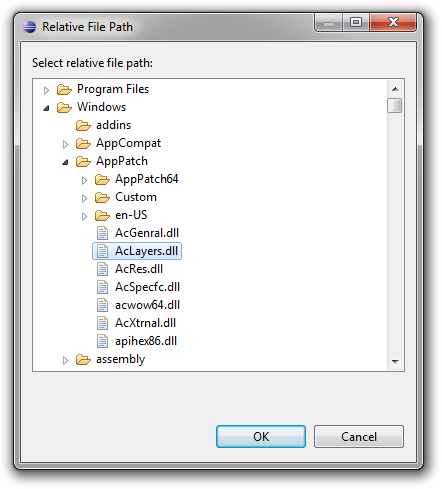
Or maybe you need to deal with relative paths, but you have custom requirements for how these relative paths are to be resolved. Sapphire still got you covered. Just replace @AbsolutePath with @BasePathsProvider annotations and implement a class that returns all possible roots...

@Type( base = IPath.class )
@BasePathsProvider( CustomBasePathsProvider.class )
@ValidFileSystemResourceType( FileSystemResourceType.FILE )
@ValidFileExtensions( "dll" )
@MustExist
    
ValueProperty PROP_RELATIVE_FILE_PATH = new ValueProperty( TYPE, "RelativeFilePath" );
    
Value<IPath> getRelativeFilePath();
void setRelativeFilePath( String value );
void setRelativeFilePath( IPath value );
public final class CustomBasePathsProvider extends BasePathsProviderImpl
{
    @Override
    public List<IPath> getBasePaths( IModelElement element )
    {
        final List<IPath> roots = new ArrayList<IPath>();
        
        roots.add( new Path( "c:/Windows" ) );
        roots.add( new Path( "c:/Program Files" ) );

        return roots;
    }
}

You will still get all the validation that you would get with an absolute path, including validation for existence which will try to locate your path using the roots returned by your base paths provider. On the UI side you will get a custom browse dialog box that lets you browse for resources in all the roots simultaneously. This can be very powerful in many contexts where the system that UI is being built for searches for the specified file in a set of defined locations.
relative-path 

String Values

Another common scenario is the case where the value must come from a list possible values not necessarily tied to something specific like file system resources. For instance, consider the case where a property must reference an entity name from the set of entities defined elsewhere.

Sapphire provides a set of three annotations to simplify these scenarios. The annotations are @PossibleValuesProvider, @PossibleValues and @PossibleValuesFromModel. Of the three annotations, the first one is the most generic one. It lets the developer implement a class that computes the set of possible values at runtime...

@PossibleValuesProvider( impl = CityNameValuesProvider.class )
    
ValueProperty PROP_CITY = new ValueProperty( TYPE, "City" );
    
Value<String> getCity();
void setCity( String value );
public class CityNameValuesProvider extends PossibleValuesProviderImpl
{
    @Override
    protected abstract void fillPossibleValues( SortedSet values )
    {
        // Your logic goes here.
    }
}

If you find that in your scenario the set of possible values is static you can use the @PossibleValues annotation instead. This annotation lets you specify the set of possible values right in the annotation instead of implementing a custom values provider.

Or maybe your scenario calls for a property to draw its possible values from another property in the model. The @PossibleValuesFromModel annotation has you covered. It lets you specify a path through the model where possible values should be harvested.

@PossibleValuesFromModel( path = "/Contacts/Name", caseSensitive = false ) 
    
ValueProperty PROP_ASSISTANT = new ValueProperty( TYPE, "Assistant" );
    
Value<String> getAssistant();
void setAssistant( String value );

Regardless of which of the three annotations you use, you will get validation that will check that the specified value is in the set of possible values. Additional attributes are available on all three of these annotations that let you customize the validation. For instance, you can change the problem severity to warning or even disable validation completely. You can even specify whether the comparison should be case sensitive. On the UI front, you will get browse button wired to the standard list item selection dialog.

possible-values 

Java Types

Sapphire even integrates with JDT to support properties that reference classes or interfaces visible to a given Java project. The developer uses the supplied JavaTypeName class as the type for a value property and then tunes the semantics using @JavaTypeConstraints and @MustExist annotations. Sapphire takes care of the rest. You get validation for type existence, kind of type (interface, class, etc.) and even whether type derives from another type. On the UI side, you get a browse button wired to JDT's type selection dialog.

In the following example, the property is specified to take a name of a non-abstract class that must extend AbstractList class while also implementing Cloneable interface.

@Type( base = JavaTypeName.class )
@JavaTypeConstraints( kind = JavaTypeKind.CLASS, type = { "java.util.AbstractList", "java.lang.Cloneable" } )
@MustExist
    
ValueProperty PROP_CUSTOM_LIST_CLASS = new ValueProperty( TYPE, "CustomListClass" );
    
Value<JavaTypeName> getCustomListClass();
void setCustomListClass( String value );
void setCustomListClass( JavaTypeName value );

java-type 

Completely Custom

Sapphire browse handling support is extensible to support cases that do not fit one of the above molds. To do this, you create a custom class that extends BrowseHandler. You can then register your browse handler globally (to activate under a condition that you specify) or locally for a specific property editor in the UI definition. The second case is more common.

Here is an example:

<property-editor>
  <property>Photo</property>
  <browse-handler>
    <class>PhotosCatalogBrowseHandler</class>
  </browse-handler>
</property-handler>

Multi-Way

One variant of the browse button pattern has baffled UI writers for years. In some cases, the semantics of the property require the use of more than one browse dialog. For instance, consider the case where the property can take an absolute path to an archive file or a folder. No established convention exists for how to handle this case and developers have tried a number of different options. Here are a few examples from Eclipse itself.


multi-way-1 

multi-way-2 

multi-way-3

Sapphire adopts the convention of using a drop-down menu from the browse button when multiple browse handlers are active concurrently. Here is what that looks like:

multi-way-sapphire

Currently, there are no model annotations that can fully describe the complex semantics of such scenarios. The developer must register the browse handlers in the UI definition. Validation should be done in a custom validator class attached via @Validator annotation.

Here is the UI definition from the above screen capture. All the system-provided browse handlers that activate when certain annotations are used are also available for direct reference from the UI definitions as can be seen in this example.

<property-editor>
  <property>MultiOptionPath</property>
  <browse-handler>
    <class>AbsoluteFilePathValueBrowseHandler</class>
    <param>
      <name>extensions</name>
      <value>jar,zip</value>
    </param>
  </browse-handler>
  <browse-handler>
    <class>AbsoluteFolderPathValueBrowseHandler</class>
  </browse-handler>
  <browse-handler>
    <class>EclipseWorkspacePathValueBrowseHandler</class>
    <param>
      <name>extensions</name>
      <value>jar,zip</value>
    </param>
    <param>
      <name>leading-slash</name>
      <value>true</value>
    </param>
  </browse-handler>
</property-editor>
