Friday, June 25, 2010

Sapphire

Little has changed in the way Java desktop UI is written since the original Java release. Technologies have changed (AWT, Swing, SWT, etc.), but fundamentals remain the same. The developer must choose which widgets to use, how to lay those widgets out, how to store the data being edited and how to synchronize the model with the UI. Even the best developers fall into traps of having UI components talk directly to other UI components rather than through the model. Inordinate amount of time is spent debugging layout and data-binding issues.

Sapphire aims to raise UI writing to a higher level of abstraction. The core premise is that the basic building block of UI should not be a widget (text box, label, button, etc.), but rather a property editor. Unlike a widget, a property editor analyzes metadata associated with a given property, renders the appropriate widgets to edit that property and wires up data binding. Data is synchronized, validation is passed from the model to the UI, content assistance is made available, etc.

This fundamentally changes the way developers interact with a UI framework. Instead of writing UI by telling the system how to do something, the developer tells the system what they intend to accomplish. When using Sapphire, the developer says "I want to edit LastName property of the person object". When using widget toolkits like SWT, the developer says "create label, create text box, lay them out like so, configure their settings, setup data binding and so on". By the time the developer is done, it is hard to see the original goal in the code that's produced. This results in UI that is inconsistent, brittle and difficult to maintain.

First, The Model

Sapphire includes a simple modeling framework that is tuned to the needs of the Sapphire UI framework and is designed to be easy to learn. It is also optimized for iterative development. A Sapphire model is defined by writing Java interfaces and using annotations to attach metadata. An annotation processor that is part of Sapphire SDK then generates the implementation classes. Sapphire leverages Eclipse Java compiler to provide quick and transparent code generation that runs in the background while you work on the model. The generated classes are treated as build artifacts and are not source controlled. In fact, you will rarely have any reason to look at them. All model authoring and consumption happens through the interfaces.

In this article we will walk through a Sapphire sample called EzBug. The sample is based around a scenario of building a bug reporting system. Let's start by looking at IBugReport.

@GenerateXmlBinding

public interface IBugReport extends IModelElementForXml, IRemovable
{
    ModelElementType TYPE = new ModelElementType( IBugReport.class );
    
    // *** CustomerId ***
    
    @XmlBinding( path = "customer" )
    @Label( standard = "customer ID" )

    ValueProperty PROP_CUSTOMER_ID = new ValueProperty( TYPE, "CustomerId" );

    Value<String> getCustomerId();
    void setCustomerId( String value );

    // *** Title ***
    
    @XmlBinding( path = "title" )
    @Label( standard = "title" )
    @NonNullValue

    ValueProperty PROP_TITLE = new ValueProperty( TYPE, "Title" );

    Value<String> getTitle();
    void setTitle( String value );
    
    // *** Details ***
    
    @XmlBinding( path = "details" )
    @Label( standard = "details" )
    @LongString
    @NonNullValue

    ValueProperty PROP_DETAILS = new ValueProperty( TYPE, "Details" );

    Value<String> getDetails();
    void setDetails( String value );
    
    // *** ProductVersion ***

    @Type( base = ProductVersion.class )
    @XmlBinding( path = "version" )
    @Label( standard = "version" )
    @DefaultValue( "2.5" )

    ValueProperty PROP_PRODUCT_VERSION = new ValueProperty( TYPE, "ProductVersion" );

    Value<ProductVersion> getProductVersion();
    void setProductVersion( String value );
    void setProductVersion( ProductVersion value );
    
    // *** ProductStage ***

    @Type( base = ProductStage.class )
    @XmlBinding( path = "stage" )
    @Label( standard = "stage" )
    @DefaultValue( "final" )

    ValueProperty PROP_PRODUCT_STAGE = new ValueProperty( TYPE, "ProductStage" );

    Value<ProductStage> getProductStage();
    void setProductStage( String value );
    void setProductStage( ProductStage value );
    
    // *** Hardware ***

    @Type( base = IHardwareItem.class )
    @ListPropertyXmlBinding( mappings = { @ListPropertyXmlBindingMapping( element = "hardware-item", type = IHardwareItem.class ) } )
    @Label( standard = "hardware" )
    
    ListProperty PROP_HARDWARE = new ListProperty( TYPE, "Hardware" );
    
    ModelElementList<IHardwareItem> getHardware();
}

As you can see in the above code listing, a model element definition in Sapphire is composed of a series of blocks. These blocks define properties of the model element. Each property block has a PROP_* field that declares the property, the metadata in the form of annotations and the accessor methods. All metadata about the model element is stored in the interface. There are no external files. When this interface is compiled, Java persists these annotation in the .class file and Sapphire is able to read them at runtime.

Sapphire has three types of properties: value, element and list. Value properties hold simple data, such as strings, integers, enums, etc. Any object that is immutable and can be serialized to a string can be stored in a value property. An element property holds a reference to another model element. You can specify whether this nested model element should always exist or if it should be possible to create and delete it. A list property holds zero or more model elements. A list can be homogeneous (only holds one type of elements) or heterogeneous (holds elements of various specified types).

Using a combination of list and element properties, it is possible to create an arbitrary model hierarchy. In the above listing, there is one list property. It is homogeneous and references IHardwareItem element type. Let's look at that type next.

@GenerateXmlBinding

public interface IHardwareItem extends IModelElementForXml, IRemovable
{
    ModelElementType TYPE = new ModelElementType( IHardwareItem.class );
    
    // *** Type ***
    
    @Type( base = HardwareType.class )
    @XmlBinding( path = "type" )
    @Label( standard = "type" )
    @NonNullValue

    ValueProperty PROP_TYPE = new ValueProperty( TYPE, "Type" );

    Value<HardwareType> getType();
    void setType( String value );
    void setType( HardwareType value );
    
    // *** Make ***
    
    @XmlBinding( path = "make" )
    @Label( standard = "make" )
    @NonNullValue

    ValueProperty PROP_MAKE = new ValueProperty( TYPE, "Make" );

    Value<String> getMake();
    void setMake( String value );
    
    // *** ItemModel ***
    
    @XmlBinding( path = "model" )
    @Label( standard = "model" )

    ValueProperty PROP_ITEM_MODEL = new ValueProperty( TYPE, "ItemModel" );

    Value<String> getItemModel();
    void setItemModel( String value );

    // *** Description ***
    
    @XmlBinding( path = "description" )
    @Label( standard = "description" )
    @LongString

    ValueProperty PROP_DESCRIPTION = new ValueProperty( TYPE, "Description" );

    Value<String> getDescription();
    void setDescription( String value );
}

The IHardwareItem listing should look very similar to IBugReport and that's the point. A Sapphire model is just a collection of Java interfaces that are annotated in a certain way and reference each other.

A bug report is contained in IFileBugReportOp, which serves as the top level type in the model.

@GenerateXmlBindingModelImpl
@RootXmlBinding( elementName = "report" )

public interface IFileBugReportOp extends IModelForXml, IExecutableModelElement
{
    ModelElementType TYPE = new ModelElementType( IFileBugReportOp.class );
    
    // *** BugReport ***
    
    @Type( base = IBugReport.class )
    @Label( standard = "bug report" )
    @XmlBinding( path = "bug" )
    
    ElementProperty PROP_BUG_REPORT = new ElementProperty( TYPE, "BugReport" );
    
    IBugReport getBugReport();
    IBugReport getBugReport( boolean createIfNecessary );
}

Let's now look at the last bit of code that goes with this model, which is the enums.

@Label( standard = "type", full = "hardware type" )

public enum HardwareType
{
    @Label( standard = "CPU" )

    CPU,
    
    @Label( standard = "main board" )
    @EnumSerialization( primary = "Main Board" )
    
    MAIN_BOARD,

    @Label( standard = "RAM" )
    
    RAM,
    
    @Label( standard = "video controller" )
    @EnumSerialization( primary = "Video Controller" )
    
    VIDEO_CONTROLLER,

    @Label( standard = "storage" )
    @EnumSerialization( primary = "Storage" )
    
    STORAGE,
    
    @Label( standard = "other" )
    @EnumSerialization( primary = "Other" )
    
    OTHER
}


@Label( standard = "product stage" )

public enum ProductStage
{
    @Label( standard = "alpha" )
    
    ALPHA,

    @Label( standard = "beta" )
    
    BETA,

    @Label( standard = "final" )
    
    FINAL
}


@Label( standard = "product version" )

public enum ProductVersion
{
    @Label( standard = "1.0" )
    @EnumSerialization( primary = "1.0" )
    
    V_1_0,
    
    @Label( standard = "1.5" )
    @EnumSerialization( primary = "1.5" )

    V_1_5,
    
    @Label( standard = "1.6" )
    @EnumSerialization( primary = "1.6" )
    
    V_1_6,
    
    @Label( standard = "2.0" )
    @EnumSerialization( primary = "2.0" )
    
    V_2_0,
    
    @Label( standard = "2.3" )
    @EnumSerialization( primary = "2.3" )
    
    V_2_3,
    
    @Label( standard = "2.4" )
    @EnumSerialization( primary = "2.4" )
    
    V_2_4,
    
    @Label( standard = "2.5" )
    @EnumSerialization( primary = "2.5" )
    
    V_2_5
}

You can use any enum as a type for a Sapphire value property. Here, once again, you see Sapphire pattern of using Java annotations to attach metadata to model particles. In this case the annotations are specifying how Sapphire should present enum items to the user and how these items should be serialized to string form.

Then, The UI

The bulk of the work in writing UI using Sapphire is modeling the data that you want to present to the user. Once the model is done, defining the UI is simply a matter of arranging the properties on the screen. This is done via an XML file.

<definition>

  <import>
    <bundle>org.eclipse.sapphire.samples</bundle>
    <package>org.eclipse.sapphire.samples.ezbug</package>
  </import>
  
  <composite>
    <id>bug.report</id>
    <content>
      <property-editor>CustomerId</property-editor>
      <property-editor>Title</property-editor>
      <property-editor>
        <property>Details</property>
        <hint>
          <name>expand.vertically</name>
          <value>true</value>
        </hint>
      </property-editor>
      <property-editor>ProductVersion</property-editor>
      <property-editor>ProductStage</property-editor>
      <property-editor>
        <property>Hardware</property>
        <child-property>
          <name>Type</name>
        </child-property>
        <child-property>
          <name>Make</name>
        </child-property>
        <child-property>
          <name>ItemModel</name>
        </child-property>
      </property-editor>
      <composite>
        <indent>true</indent>
        <content>
          <separator>
            <label>Details</label>
          </separator>
          <switching-panel>
            <list-selection-controller>
              <property>Hardware</property>
            </list-selection-controller>
            <panel>
              <key>IHardwareItem</key>
              <content>
                <property-editor>
                  <property>Description</property>
                  <hint>
                    <name>show.label.above</name>
                    <value>true</value>
                  </hint>
                  <hint>
                    <name>height</name>
                    <value>5</value>
                  </hint>
                </property-editor>
              </content>
            </panel>
            <default-panel>
              <content>
                <label>Select a hardware item above to view or edit additional parameters.</label>
              </content>
            </default-panel>
          </switching-panel>
        </content>
      </composite>
    </content>
    <hint>
      <name>expand.vertically</name>
      <value>true</value>
    </hint>
    <hint>
      <name>width</name>
      <value>600</value>
    </hint>
    <hint>
      <name>height</name>
      <value>500</value>
    </hint>
  </composite>

  <dialog>
    <id>bug.report.dialog</id>
    <label>Create Bug Report (Sapphire Sample)</label>
    <initial-focus>Title</initial-focus>
    <content>
      <composite-ref>
        <id>bug.report</id>
      </composite-ref>
    </content>
    <hint>
      <name>expand.vertically</name>
      <value>true</value>
    </hint>
  </dialog>
  
</definition>

A Sapphire UI definition is a hierarchy of parts. At the lowest level we have the property editor and a few other basic parts like separators. These are aggregated together into various kinds of composities until the entire part hierarchy is defined. Some hinting here and there to guide the UI renderer and the UI definition is complete. Note the top-level composite and dialog elements. These are parts that you can re-use to build more complex UI definitions or reference externally from Java code.

Next we will write a little bit of Java code to open the dialog that we defined.

final IFileBugReportOp op = new FileBugReportOp( new ModelStoreForXml( new ByteArrayModelStore() ) );
final IBugReport report = op.getBugReport( true );

final SapphireDialog dialog 
    = new SapphireDialog( shell, report, "org.eclipse.sapphire.samples/sdef/EzBug.sdef!bug.report.dialog" );
        
if( dialog.open() == Dialog.OK )
{
    // Do something. User input is found in the bug report model.
}

Pretty simple, right? We create the model and then use the provided SapphireDialog class to instantiate the UI by referencing the model instance and the UI definition. The pseudo-URI that's used to reference the UI definition is simply bundle id, followed by the path within that bundle to the file holding the UI definition, followed by the id of the definition to use.

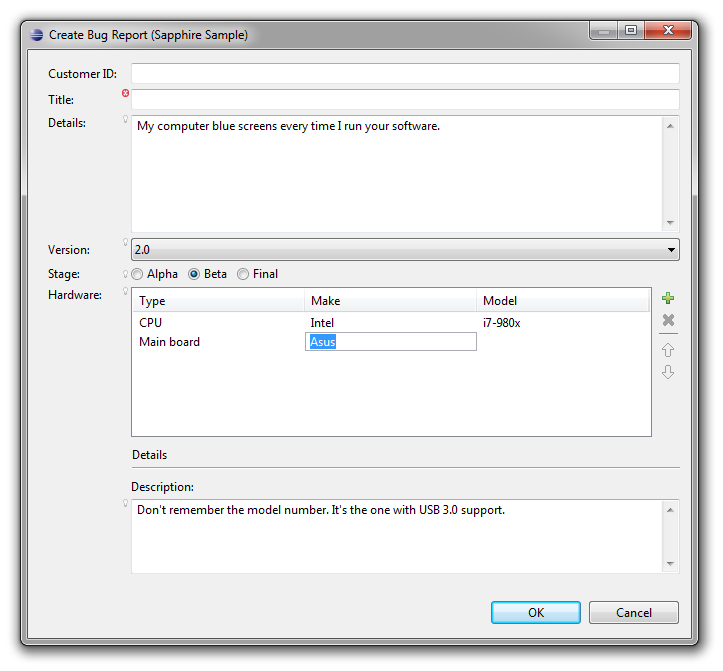
Let's run it and see what we get...
dialog

There you have it. Professional rich UI backed by your model with none of the fuss of configuring widgets, trying to get layouts to do what you need them to do or debugging data binding issues.

One Step Further

A dialog is nice, but really a wizard would be better suited for filing a bug report. Can Sapphire do that? Sure. Let's first go back to the model. A wizard is a UI pattern for configuring and then executing an operation. Our model is not really an operation yet. We can create and populate a bug report, but then we don't know what to do with it.

Any Sapphire model element can be turned into an operation by adding an execute method. We will do that now with IFileBugReportOp. In particular, IFileBugReportOp will be changed to also extend IExecutableModelElement and will acquire the following method definition:

// *** Method: execute ***
    
@DelegateImplementation( FileBugReportOpMethods.class )
    
IStatus execute( IProgressMonitor monitor );

Note how the execute method is specified. We don't want to modify the generated code to implement it, so we use delegation instead. The @DelegateImplementation annotation can be used to delegate any method on a model element to an implementation located in another class. The Sapphire annotation processor will do the necessary hookup.

public class FileBugReportOpMethods
{
    public static final IStatus execute( IFileBugReportOp context, IProgressMonitor monitor )
    {
        // Do something here.
        
        return Status.OK_STATUS;
    }
}

The delegate method implementation must match the method being delegated with two changes: (a) it must be static, and (b) it must take the model element as the first parameter.

Now that we have completed the bug reporting operation, we can return to the UI definition file and add the following:

<wizard>
  <id>wizard</id>
  <label>Create Bug Report (Sapphire Sample)</label>
  <page>
    <id>main.page</id>
    <label>Create Bug Report</label>
    <description>Create and submit a bug report.</description>
    <initial-focus>Title</initial-focus>
    <content>
      <with>
        <property>BugReport</property>
        <content>
          <composite-ref>
            <id>bug.report</id>
          </composite-ref>
        </content>
      </with>
    </content>
    <hint>
      <name>expand.vertically</name>
      <value>true</value>
    </hint>
  </page>
</wizard>

The above defines a one page wizard by re-using the composite definition created earlier. Now back to Java to use the wizard...

final IFileBugReportOp op = new FileBugReportOp( new ModelStoreForXml( new ByteArrayModelStore() ) );
op.getBugReport( true );  // Force creation of the bug report.

final SapphireWizard<IFileBugReportOp> wizard 
    = new SapphireWizard<IFileBugReportOp>( op, "org.eclipse.sapphire.samples/sdef/EzBug.sdef!wizard" );
        
final WizardDialog dialog = new WizardDialog( shell, wizard );
        
dialog.open();

SapphireWizard will invoke the operation's execute method when the wizard is finished. That means we don't have to act based on the result of the open call. The execute method will have completed by the time the open method returns to the caller.

The above code pattern works well if you are launching the wizard from a custom action, but if you need to contribute a wizard to an extension point, you can extend SapphireWizard to give your wizard a zero-argument constructor that creates the operation and references the correct UI definition.

Let's run it...

wizard

One More Step

Now that we have a system for submitting bug reports, it would be nice to have a way to maintain a collection of these reports. Even better if we can re-use some of our existing code to do this. Back to the model.

The first step is to create IBugDatabase type which will hold a collection of bug reports. By now you should have a pretty good idea of what that will look like.

@GenerateXmlBindingModelImpl
@RootXmlBinding( elementName = "bug-database" )

public interface IBugDatabase extends IModelForXml
{
    ModelElementType TYPE = new ModelElementType( IBugDatabase.class );

    // *** BugReports ***
    
    @Type( base = IBugReport.class )
    @Label( standard = "bug report" )
    @ListPropertyXmlBinding( mappings = { @ListPropertyXmlBindingMapping( element = "bug", type = IBugReport.class ) } )
    
    ListProperty PROP_BUG_REPORTS = new ListProperty( TYPE, "BugReports" );
    
    ModelElementList<IBugReport> getBugReports();
}

That was easy. Now let's go back to the UI definition file.

Sapphire simplifies creation of multi-page editors. It also has very good integration with WTP XML editor that makes it easy to create the very typical two-page editor with a form-based page and a linked source page showing the underlying XML. The linkage is fully bi-directional.

To create an editor, we start by defining the structure of the pages that will be rendered by Sapphire. Sapphire currently only supports one editor page layout, but it is a very flexible layout that works for a lot scenarios. You get a tree outline of content on the left and a series of sections on the right that change depending on the selection in the outline.

<editor-page>
  <id>editor.page</id>
  <page-header-text>Bug Database (Sapphire Sample)</page-header-text>
  <initial-selection>Bug Reports</initial-selection>
  <root-node>
    <node>
      <label>Bug Reports</label>
      <section>
        <description>Use this editor to manage your bug database.</description>
        <content>
          <action-link>
            <action-id>node:add</action-id>
            <label>Add a bug report</label>
          </action-link>
        </content>
      </section>
      <node-list>
        <property>BugReports</property>
        <node-template>
          <dynamic-label>
            <property>Title</property>
            <null-value-label>&lt;bug&gt;</null-value-label>
          </dynamic-label>
          <section>
            <label>Bug Report</label>
            <content>
              <composite-ref>
                <id>bug.report</id>
              </composite-ref>
            </content>
          </section>
        </node-template>
      </node-list>
    </node>
  </root-node>
</editor-page>

You can see that the definition centers around the outline. The definition traverses the model as the outline is defined with sections attached to various nodes acquiring the context model element from their node. The outline can nest arbitrarily deep and you can even define recursive structures by externalizing node definitions, assigning ids to them and then referencing those definitions similarly to how this sample references an existing composite definition.

The next step is to create the actual editor. Sapphire includes several editor classes for you to choose from. In this article we will use the editor class that's specialized for the case where you are editing an XML file and you want to have an editor page rendered by Sapphire along with an XML source page.

public final class BugDatabaseEditor extends SapphireEditorForXml
{
    public BugDatabaseEditor()
    {
        super( "org.eclipse.sapphire.samples" );
        setEditorDefinitionPath( "org.eclipse.sapphire.samples/sdef/EzBug.sdef/editor.page" );
    }

    @Override
    protected IModel createModel( final ModelStore modelStore )
    {
        return new BugDatabase( (ModelStoreForXml) modelStore );
    }
}

Finally, we need to register the editor. There are a variety of options for how to do this, but covering all of these options is outside the scope of this article. For simplicity we will register the editor as the default choice for files named "bugs.xml".

<extension point="org.eclipse.ui.editors">
  <editor
    class="org.eclipse.sapphire.samples.ezbug.ui.BugDatabaseEditor"
    default="true"
    filenames="bugs.xml"
    id="org.eclipse.sapphire.samples.ezbug.ui.BugDatabaseEditor"
    name="Bug Database Editor (Sapphire Sample)"/>
</extension>

That's it. We are done creating the editor. After launching Eclipse and creating a bug.xml file, you should see an editor that looks like this:

 editor-small

Sapphire really shines in complex cases like this where form UI is sitting on top a source file that users might edit by hand. In the above screen capture, what happened is that the user manually entered "BETA2" for the product stage in the source view. There is a problem marker next to the property editor and the yellow assistance popup is accessible by clicking on that marker. The problem message is displayed along with additional information about the property and available actions. The "Show in source" action, for instance, will immediately jump to the editor's source page and highlight the text region associated with this property. This is very valuable when you must deal with large files. These facilities and many others are available out of the box with Sapphire with no extra effort from the developer.

Conclusion

Now that you've been introduced to what Sapphire can do, compare it to how you are currently writing UI code. All of the code presented in this article can be written by a developer with just a few weeks of Sapphire experience in an hour or two. How long would it take you to create something comparable using your current method of choice?

I hope that this article has piqued your interest in Sapphire. Oracle is committed to bringing this technology to the open source community. We have proposed a project at the Eclipse Foundation. If you are interested, you should post a message on the project's forum. Introduce yourself and describe your interest. We are actively seeking both consumers of this technologies as well as potential partners to come join the effort and help us take this technology in the directions that we have not yet anticipated.

Tool for exporting formatted code to HTML?

Quick poll… When writing blogs or articles, what do you use to nicely format code snippets as HTML? I am particularly curious if anyone found an Eclipse plugin that simply exports the style that’s visible in the Eclipse editor rather than trying to implement parsing and styling on its own.

Thursday, May 27, 2010

JDT, Manifest Classpath, Classpath Containers and Helios

In the interest of public service, thought I’d communicate a behavior change in Eclipse Java Developer Tools (JDT) coming in Helios (aka Eclipse 3.6). In Galileo (aka Eclipse 3.5), JDT started resolving manifest classpath in libraries added to project’s build path. This worked whether the library was added to project’s build path directly or via a classpath container, such as the user library facility provided by JDT or one implemented by a third party. In Helios, this behavior was changed to exclude classpath containers from manifest classpath resolution.

This change in behavior has potential to affect users who have started relying on this facility in their projects. A workspace with projects that built fine in Galileo may not build in Helios. The cause may not be obvious as the only thing that the user will notice is build errors complaining of missing types. The user will need to figure out where those types were coming from originally and take steps to make sure those libraries are referenced directly. The exact way to do that is dependent on the implementation of the classpath container in question. For instance, if the container is based on JDT user library feature, then the definition of the user library will need to be adjusted in preferences. Alternatively, users can set a system property in their eclipse.ini file to revert to Galileo behavior. Adding the following line to the end of the file should to the trick:

-DresolveReferencedLibrariesForContainers=true

This change can also affect third parties shipping plugins on top of JDT that implement classpath containers. If the classpath container was implemented to rely on manifest classpath resolution, it will need to be updated to work properly on Helios. Fortunately, JDT provides an API to make this process less painful…

JavaCore.getReferencedClasspathEntries( [IClasspathEntry], [IJavaProject] )

The above API call will do manifest classpath resolution on the library referenced by the provided classpath entry. Pass in null for the second parameter. The result is an array of classpath entries that can be added to the original set in classpath container initialization. Several things to watch out for…

  1. Make sure not add the same library twice. This is fairly easy to do, especially if your container implementation gives user some control over the contents. The last time I ran into this, JDT threw an exception on container initialization.
  2. Check returned entries for existence before adding them to your container. The getReferencedClasspathEntries method does not check for existence, but if your container adds a reference to a non-existing file, JDT will put an error in the problems view and nothing will build. Could be an ugly surprise for your users as a code fix in the container implementation will be required to resolve this.
  3. The getReferencedClasspathEntries method is new for Helios, which means that your container implementation will no longer be compatible with Galileo. If you need to support Galileo and Helios from the same code base, you will need to implement your own manifest classpath resolution.

References

  1. Bug 305037 - missing story for attributes of referenced JARs in classpath containers
  2. Bug 313965 - Breaking change in classpath container API
  3. Bug 313890 - Migration guide to 3.6 for containers with MANIFEST-referred entries

Olivier Thomann has asked me to include the following clarifying statement:

“Galileo behavior was wrong as a container should control exactly what is inside the container. So Helios fixed this issue.”

I have no disagreement with that statement. My purpose in writing this blog is purely to document a difference in behavior from Galileo to Helios that can appear to many as a regression. I do think this change could have been handled better, but that’s besides the point at this stage in Helios release and not the reason that I wrote this post.

Friday, April 3, 2009

Eclipse is a Product and that’s a Good Thing (tm)

I know that Bjorn is just trying to stimulate the discussion and challenge the status quo with his recent blog posts. That’s a good thing. I do find myself disagreeing completely with his latest proposal to stop distribution of binaries from eclipse.org and instead shift the responsibility to various member companies. Basically, we would go from the FireFox model to the Linux model.

Here is a quote from Bjorn’s blog post responding to some of the negative comments about his proposal:

Changing Things Will Kill Eclipse. I just don't see this. For example, The Linux Foundation doesn't distribute a single binary and yet Linux is so popular that it is scaring Microsoft. Wayne also pointed this out.

The important question to ask here is could Linux have been much more successful if there was a single canonical distribution provided by the Linux Foundation. Yes, Linux is getting more popular, but not nearly as fast as people would have liked and its adoption curve against competition is not nearly as good as the adoption curve for other major open source projects that follow the product model. Why is that? The dozens of different Linux distros fragment the market, create confusion for new users (have to make a choice between distros that are potentially radically different when you don’t yet have a clue), create barriers to skill transition (just because you’ve learned how to use Linux on your machine doesn’t mean that you will be able to use Linux on friend’s machine), and make it significantly more expensive for vendors to deliver new software for the platform (what works on one distro may not work on another). Now compare that to FireFox. It is much younger project than Linux, but has already managed to make significantly more progress against competition than Linux. This is not an accident. You don’t have to take my word for it, a number of people have written about these problems with Linux and how they stand in the way of its growth. Why would we want to emulate the Linux model?

Platform alone is not a good strategy. No matter how good the platform is, companies and individuals will only use the platform if it enables them to reach a significant user base. It takes a product to do that. Not dozens of different products that confuse the users and make it more difficult to build on the platform, but a single trusted canonical product. Eclipse as a Product helps ensure success of Eclipse as a Platform.

Ultimately, what is the problem that we would be trying to solve by stopping distribution of binaries at eclipse.org? Bjorn makes the argument that Eclipse community delivers such a poor quality product and that users are having such a hard time receiving adequate support on the forums that we need to do something drastic to address the problem. How do we evaluate this argument? You cannot look at forum posts alone. The voices of a few disgruntled individuals drown out the opinions of thousands of satisfied users. After all, people only go to forums when they have problems. I would look at Eclipse adoption curves instead as a true measure of user satisfaction. A product that has significant quality problems would not keep growing. The growth would stall and we should see adoption numbers going down. We are not seeing that with Eclipse. The evidence just does not backup Bjorn’s argument.

I do happen to agree that there is more that we could do to help users get better support through paid channels, but we do not need to resort to drastic measures like what Bjorn is proposing. The harm from going forward with this proposal would be far greater than potential benefits.

Sunday, March 1, 2009

Count me out from p2 fan club

I don’t make habit of ranting about technology, but p2 has been driving me up the wall. The old update manager may not have been perfect, but at least it didn’t have the bad habit of preventing installation cases that should work from working.

So we are putting finishing touches on a new version of Oracle Enterprise Pack for Eclipse (OEPE) and it’s time to test various installation scenarios. Eclipse Ganymede SR2 was also just released last week, so we are verifying compatibility with it. One of the basic installation scenarios that we are testing starts out with an all-in-one kit that includes Eclipse Ganymede GA with the previous version of OEPE. The second step in the scenario is to update all of the Eclipse components in that installation. The new version of OEPE requires at least SR1. I let Eclipse search for updates and install everything that it finds. That works. Presumably at this point, the installation should be equivalent to a fresh Eclipse Ganymede SR2 install. The final step is to install the new version of OEPE from a local update site. P2 thinks for a while and then says there are problems that will prevent the installation from working and refuses to go forward.

WTF? I know perfectly well that the plugins we are installing are compatible with Ganymede SR2. They’ve been built using SR2 as the target platform and they work just fine when simply added to the Eclipse installation. Now what? Taking a look at the problems reported by p2, I find about a hundred messages that look like the following.

Cannot find a solution where both "bundle org.eclipse.wst.validation [1.2.0,1.3.0)" and "bundle org.eclipse.wst.validation [1.1.0,1.2.0)" are satisfied.
Unsatisfied dependency: [org.eclipse.jst.ws.axis.consumption.core 1.0.204.v200708151945] requiredCapability: osgi.bundle/org.eclipse.core.resources/[3.2.0,3.4.0)
Unsatisfied dependency: [org.eclipse.jst.ws.axis.consumption.ui 1.0.204.v200801222138] requiredCapability: osgi.bundle/org.eclipse.core.resources/[3.2.0,3.4.0)
Unsatisfied dependency: [org.eclipse.wst.ws 1.0.204.v200711140435] requiredCapability: osgi.bundle/org.eclipse.core.resources/[3.2.0,3.4.0)
Unsatisfied dependency: [org.eclipse.wst.command.env.ui 1.0.203.v200709052219] requiredCapability: osgi.bundle/org.eclipse.core.resources/[3.2.0,3.4.0)

These messages don’t make a whole lot of sense. None of them reference plugins that I am trying to install and there is no hint in the messages regarding what actually caused the problem. I looked at one of them in detail to make sure I wasn’t missing something obvious. The second message says that a dependency of org.eclipse.jst.ws.axis.consumption.core plugin cannot be found. That makes sense since it’s a very old version of the plugin that’s not compatible with Ganymede. The question is why p2 trying to resolve that plugin? I look at my installation and I see versions 1.0.304.v200805140230 and 1.0.306.v200810082309. That makes sense. Those versions correspond to what shipped with Ganymede GA and Ganymede SR2. I do not find version 1.0.204.v200708151945 that p2 is complaining about anywhere.

At this point, I gave up trying to make sense of the problem messages and proceeded to blindly try various changes to the way the OEPE update site is constructed to see if I would get a different result. Two alternatives I tried made this scenario work: (a) removing all version constraints from plugin dependencies and (b) reverting to the old-style update site with a site.xml file and no p2 metadata. We still need to do some more testing, but we probably will go with (b) and give up on p2-enabling our update site.

I had reservations about p2 since the poor way in which it was rolled out roughly a year ago, but after a year of fighting with it and this recent experience, I can honestly say (without an ounce of exaggeration) that p2 is the worst regression ever introduced into the Eclipse Platform. I understand the problems that p2 is supposed to solve, but there is just no excuse for destroying the most basic of core scenarios in the process. If it wasn’t ready for Ganymede, it should have stayed as an incubator for a while longer.

Thursday, February 5, 2009

Field-level key bindings

Sometimes you need to create key bindings in Eclipse which are scoped to just a single control. I had one such case today. I have a table cell editor that’s based on the TextCellEditor, but adds a small graphical browse button. It works great as long as you are using a mouse, but I needed to make the browsing function keyboard accessible for people with disabilities.

Eclipse has a nice command framework that lets you define commands in abstract sense, place them in contexts, define key bindings and finally associate handlers to do the actual work. Finding an example that puts all of these concepts to work together in a particular way can be challenging, so I thought I would share my solution to the above problem and explain some of this API along the way.

The first step is to define the command. A command is an operation that a user can perform, but we don’t actually specify how to perform that operation when defining the command. That comes later when we add a handler. Every command must belong to a category. Here we define a category as well. You will typically want to create a category for each broad functional area to make it easier for users to find and manage your commands in the preferences.

<extension point="org.eclipse.ui.commands">
  <category
    id="my.category"
    name="My Category"/>
  <command
    id="my.browse.command"
    categoryId="my.category"
    name="Browse"/>
</extension>

The next step is to define the context. The context controls what commands are available via key bindings based on where in the workbench the user is working. Typically views and editors define contexts, but there is nothing stopping you from defining one that is more focused. In this example, we will create a context for fields with browsing capability.

<extension point="org.eclipse.ui.contexts">
  <context
    id="my.browseable.field.context"
    parentId="org.eclipse.ui.contexts.window"
    name="In Browseable Field"/>
</extension>

The final declarative step is to define the key binding. The following assigns Ctrl+L to the browse command in the browseable field context.

<extension point="org.eclipse.ui.bindings">
  <key
    sequence="M1+L"
    contextId="my.browseable.field.context"
    commandId="my.browse.command"
    schemeId="org.eclipse.ui.defaultAcceleratorConfiguration"/>
</extension>

And now for the final bit of magic… The following function brings it all together by enabling the browseable field context and associating a handler with the browse command when the specified text field gains focus. When the focus is lost, the context and the handler are deactivated.

public static void addBrowseKeyBinding( final Text textField,
                                        final Runnable browseOperation )
{
    final IHandler browseCommandHandler = new AbstractHandler() 
    {
        public Object execute( final ExecutionEvent event )
        {
            browseOperation.run();
            return null;
        }
    };
        
    final IWorkbench workbench = PlatformUI.getWorkbench();
    
    final IHandlerService handlerService 
        = (IHandlerService) workbench.getService( IHandlerService.class );

    final IContextService contextService 
        = (IContextService) workbench.getService( IContextService.class );
        
    final IHandlerActivation[] handlerActivationRef = new IHandlerActivation[ 1 ];
    final IContextActivation[] contextActivationRef = new IContextActivation[ 1 ];
        
    textField.addFocusListener
    (
        new FocusListener()
        {
            public void focusGained( final FocusEvent event )
            {
                final IHandlerActivation handlerActivation
                    = handlerService.activateHandler( "my.browse.command", browseCommandHandler );
                    
                handlerActivationRef[ 0 ] = handlerActivation;
                    
                final IContextActivation contextActivation
                    = contextService.activateContext( "my.browseable.field.context" );
                    
                contextActivationRef[ 0 ] = contextActivation;
            }

            public void focusLost( final FocusEvent event )
            {
                handlerService.deactivateHandler( handlerActivationRef[ 0 ] );
                contextService.deactivateContext( contextActivationRef[ 0 ] );
            }
        }
    );
}

Sunday, February 1, 2009

Better way to manage dependency version ranges

OSGi provides an extremely powerful and precise mechanism for controlling acceptable version ranges when specifying dependency on bundles or packages. In theory (as described by policies of various projects at Eclipse), the developer would take into account his plugin’s API and behavior needs, cross-reference that with version information about the bundle in question and carefully craft the version range in dependency declaration to accurately reflect his plugin’s actual needs while leaving the version range as open as possible to allow users maximum flexibility when composing an installation. Further, in theory, the developer should be continuously aware of dependency version ranges specified in his product’s various plugins and how they correlate to functionality exposed by those plugin. As development progresses, the developer is supposed to be able to spot when he started depending on functionality that’s not available in the specified min version and reset the min version accordingly.

That’s the theory. In practice I haven’t met a single developer with sufficient time on their hands or sufficient mental capacity to keep all of the necessary information in his head at all times in order to properly apply this policy. What I’ve seen happen most often is that the min range gets set based on whatever the plugin version happens to be at the time the dependency is first added. PDE helpfully inserts this information in your manifest by default. The max version then gets set by applying a team policy (typically by bumping up either the major or the minor version). This happens when dependency is first introduced. As the code continues to evolve, the min version is typically not touched again. The max version is incremented when the build gets broken by the dependency bumping up their versions past a certain point. The cycle repeats.

After many years of observing this situation, I am convinced that having developers manage version ranges creates a lot of overhead and does not yield satisfactory results no matter how hard people try.  To me, dependency version ranges are most useful when you have shipped your product in binary form. When taken collectively across a component (collection of bundles), they represent a statement of what your team is willing to support as a working configuration. Ideally, this information should be consistent across plugins and as accurate as possible.

Any time you talk about setting version ranges, you are considering three versions:

  1. The version that you developed and did most of your testing with. I call this the “target version”. Typically, this is what you would list as recommended configuration in your documentation.
  2. The minimum version that you are willing to support. The level of testing you can afford to allocate to this version is bound to be less than what you would allocate for the target version, so there is a certain amount of risk that an undetected issue is going to slip through. The further back you go from the target version when setting the minimum version, the greater your risk.
  3. The maximum version that you are willing to support. Since this version will typically not exists at the time of your ship date, setting this version involves an educated guess based on understanding of what policies your dependencies use when incrementing their versions and the degree to which you are relying on undocumented (internal) code and behaviors. The spread between the target version and the maximum version is where you highest risk lies. On one hand you’d like to assure long viability of your release in the field. On the other hand, the further out you go, the greater the risk that your product will not work and make a liar out of you in the eyes of your users.

Because getting the above version decisions right and consistent across a component is extremely important, it is not a good idea for individual developers to be making these decisions on a plugin-by-plugin basis. In an Open Source environment, this should be a component-wide decision made collectively by the committers. In a commercial environment, this decision is often made higher up in the organization based on availability of resources and target user base considerations.

When the overall decision is made, it is typically expressed in broad terms. For instance… “this version will ship on Ganymede SR1, but should work with all versions of Ganymede starting with GA”. It is then up to developers to translate that requirement into version ranges in the manifest.

That’s a ton of tedious manual work with lots of room for mistakes. In other words, a perfect candidate for automation. A few years ago, I wrote a set of two custom Ant tasks to automate this process. The first task reads an Eclipse installation and produces an inventory file that lists id and version of every bundle found. The second tasks takes as input an inventory file representing the minimum platform, an inventory file representing the target platform and a policy for setting the maximum versions.  For every dependency, the task looks up the version from the minimum platform inventory. That becomes the left-hand-side of the version range. It then looks up the bundle version in the target platform inventory and applies the policy function to it. Here are some examples of policy functions: “x.y.z ->x+1.0.0”, “x.y.z ->x.y+1.o” or the extremely conservative “x.y.z ->x.y.z+1”. You can set different policies for different plugins or components based on what you know of their versioning conventions. The version returned by the policy function becomes the right-hand-side of the version range.

We have been using these two tasks to automate and improve the quality of our version ranges for several releases of Eclipse tooling products at BEA and now at Oracle. Developers don’t set the versions on the dependencies specified in the bundle manifests stored in the source repository. At the end of every build, a process runs that splices version ranges into the manifests just prior to packaging the bundles for distribution. The target inventory is always generated on the fly based on whatever the product is building against. The minimum platform inventory is generated once when the minimum platform decision is made. The inventory is then stored in the source repository.

This has been an extremely useful process improvement for us. Not only do we have more confidence in the version ranges encoded in our product distributions, but it takes significantly less work for developers to manage all of this. The developers never have to think about dependency versions during normal course of development and integrating new versions of dependencies takes less work (since version ranges in manifest don’t have to be fixed manually to get the build to work).